Layout
Configure your design using these layout components:
- Background: Template models with designated regions for inserting other models and/or text
- Model: Any component from the Design & Make library
- Text: Text blocks inserted onto predefined curves or within a box
Usage Options
You can use some of these components flexibly:
- Models on their own (without a background)
- Backgrounds on their own (without a model)
- Models inserted into background regions
Layout Component

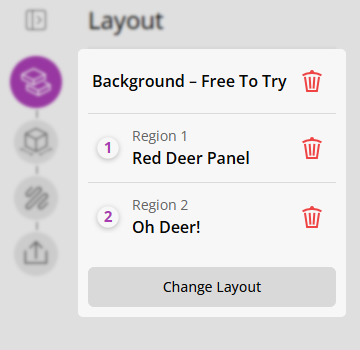
A component in the layout form consists of 3 parts,
- Number: Which helps match up the item in the form with the region in the view
- Name: The name of the component
-
Add/Delete button
: Remove the component from the layout
You can add or modify any component in your design at any point.
Multi-Type Regions
Some regions support adding models or text, and some only accept models, and some only accept text.
This will be marked by the region icon:
- Model Region:
- Text Region:
- Multi Region:
Manipulating the model
Once you have a model in your region, click the model entity (or its canvas icon) to enter the Model Edit step, where all scaling, rotation, and style controls are available.
To replace the current model with a different one — or to switch to text on a multi-type region — use the switch button (model-type icon) in the step header to open the import dialog.